EASY WAY TO FLASH ALREADY FLASHED ROME

Install walkmansense rom without rom Easy and Quick Method

Here comes the new project from me i just figured it out that we can restore roms.


Caution: I am not responsible for any kind of damage during the process.

Step1: 
 Before you start go to playstore and download Goomanager and install one with green icon goo if you dont know how to install you can go to this link for more info  to install Twrp then back up your SD-card data and reboot into recovery mode ensure that Twrp recovery is installed then
go to advance and partition SD card and Choose size of minimum of 1 GB and Swap size 0 and EXT3 then go to wipe every thing from wipe menu except Factory Reset.

Step 2:
Go to this link and download zip file.

Step 3:
Unzip the file and copy to SD-CARD just copy if TWRP folder already exists on sd card delete it and copy.
Step 4: 
Then reboot into recovery mode and then go to restore then u should see folder with name to_install select and make sure all the boxes are checked then swipe to install wait for install then after installation is complete reboot into system. wait for 3-5 min then enjoy.
After boot wait for 40 sec and start quick settings.

NOTES: All apps works fine with battery saving and smoothly dont forget to post your view. 

Walkman Sense 4.1 {Stable } and fast no lagging one must try it, including errors fixed with battery drain.

Originally developed, HTC Sense 4.0 Lite is ported from HTC One V RUU Asia by shekhutanwar and stripped by OP.
Its based on ICS 4.0.3 with HTC Sense 4.0 UI.


-------------------------------------------------------------------------------------------------------------------------------------------------------------------
Quote:
......Warning......


* Your warranty is now void.
* I am not responsible for bricked devices, dead SD cards,
* there are several apps missing in this ROM
* so dont blame me if you dont get your favourite App in there
* coz if you point a finger at me I'll point at you laughing my heart out on you
* This ROM is still WIP so some Bugs might exist
* All suggestions are Welcomed
* but personal Demands will not be Entertained here

WORKING
----------------

- Hardware Acceleration
- Camera
- Camcorder ( Video Recording )
- Touchscreen
- WiFi
- Bluetooth
- WiFi Tethering
- Wifi Direct (Patially Working)
- GPS
- Accelerometer
- Ambient Light Sensor
- FM Radio
- Audio
- Video
- RIL
- Mobile Data
- USB Mass Storage
- SDcard
- ADB
- USB Tethering
- Root
-Everything (as far as I know, If some bugs appear please report in the thread)

BUGS
---------

-> Vpn Doesn't Work
->You can tell any other if found any


-------------------------------------------------------------------------------------------------------------------------------------------------------------------

Kernel Sources:-
----------------------


AS Same Kernel compiled by shekhutanwar for his Build 9 was used after modification Sources are same as well....

Link to The Source CODE
Kernel 3.0.16 Source Code


CREDITS:-
--------------

@shekhutanwar -> For his Rom which I took as base
@sakshamx -> For Kernel
@arunsai123 -> For his Support
@-NickHalden- -> For his Aroma Script which I took for help 
@#Superuser -> For helping me and for his suggestions
@siddharth1102-> For his small little fixes and suggestions
@xaak -> For his Sense 5 Icons that I used in Build #5
@laehmic -> For his Sense 5 Quick Settings App

Quote:
I think I mentioned everyone up there. Still PM me if I missed anyone out there.
-------------------------------------------------------------------------------------------------------------------------------------------------------------------

ScreenShots:
------------------


General Screenies

Music Players

WEB Browsers

Fonts

File Managers

StatusBars

Kernels

Memory Used in /System

Install HTC Apps as User Apps

------------------------------------------------------------------------------------------------------------------------------------------------------------------------------------------
------------------------------------------------------------------------------------------------------------------------------------------------------------------------------------------

Instructions:
------------------


  1. Yannous'90 recovery recommended'/ TWRP
  2. Partition SD Card
  3. Make Sd-Ext of 1 GB to increase Internal Memory
  4. Download ROM.zip
  5. Format manually : /boot', /cache, /data, /system, /sd-ext,
  6. Flash ROM.zip
  7. Choose Options from Aroma As per your desire
  8. Reboot and complete setup
  9. Stay Happy


Features:
------------------

  • Super Stripped
  • Fits in System Nand
  • Super Smooth
  • Everything Included in ROM.zip
  • Customizable through Aroma Installer
  • All Gapps Included
  • NO HTC BLOATS
  • Stable


Change Logs:
------------------


Walkman Sense 4.0 (lite)


Walkman Sense 4.1


------------------------------------------------------------------------------------------------------------------------------------------------------------------------------------------
------------------------------------------------------------------------------------------------------------------------------------------------------------------------------------------

Downloads:
------------------


WalkMan Sense 4.0 (lite) Build #5.2


WalkMan Sense 4.1 (lite) Build #6
------------------------------------------------------------------------------------------------------------------------------------------------------------------------------------------
------------------------------------------------------------------------------------------------------------------------------------------------------------------------------------------

Important Note:
------------------


->Read All the Instructions on this Post carefully.....

-> Use Seeder and Greenify apps to boost UI Smoothness

-> If your Native Storage Wizard (Cache Cleaner) FC's in Build #5.2 just install Native HTC Mail App as user app It wont FC anymore


------------------------------------------------------------------------------------------------------------------------------------------------------------------------------------------
------------------------------------------------------------------------------------------------------------------------------------------------------------------------------------------

User Reviews:
------------------


Quote:

Posted by Renz Hernandez (on facebook)

switched to new to hacking's Ultra lite sense 4 build... Rom is pretty smooth even without OC

Smooth rom, sound makes me pleasure so good........ Great work by the way for trimming sense 

Quote:
Posted by Jeffi Himawan (on facebook)


i must say ur rom is awesome, it booted for me without deleting any single apk, so smooth even after flashing memory increasing kernel
so much recommended daily driver rom

Quote:
Originally Posted by amit.lohar View Post
Rom boots within 3 mins even aftr flashing memory increasing kernel..
damn smooth rom..rather SMOOTHEST SENSE ROM EVER 
u can feel smoothness evn while setting up the phone..aftr initial boot itslf.. .........
BEST SENSE ROM 

Quote:
Originally Posted by wmapt View Post
This is the best sense 4 fully working Rom.
It's my daily driver.
For me minicm9 and this Rom ar the fastest
Rom for our Pico.

Thanks for fitting it in nand memory.

Sent from my LG-E460 using xda app-developers app

Revolution Sense 5 V2.5 Android 4.0.3 [ Personaly tested ]


                                                                            Credits
I've personally tested this Rom and recommend other pico user  to install the rom because i'm fully satisfied with it.
Quote:

A huge thanks to russell664 and einstein.frat for amazing rom
Thanks to derefas to port this rom
myHUB - Fully Sensed HUB – by Microsmile link
Thanks to shekhutanwar for FLYROM v4
Thanks to Hpsgil for apps

Note:Avoid Kanging Themes And Icons Do Take My Permission

Here is a my first build. try to make some different 


Specially Whole Credit Goes to XDA Forum


Features

Quote:

Rom Based On Shekhutanwar FLYROM v4
Sense 5 Icons Added
Support myHUB ( Credit Goes to mikrosmile)
New background
Download more background with myhub (update soon)
Available background
All Sense Skin Support
update framework icons
Support OTA Update


[QUOTE]Installation Instructions

Minimum Requirements to Flash Rom:-
SD-EXT Partition with Size 1 GB
Instructions to Flash Rom:-
1. Copy Dark Revolution sense v1.1 zip file to sd-card.
2. Reboot into Recovery.
3. format boot,cache, sd-ext, System, Data,
4. Install zip from sd card and select the zip file and then select yes to Flash.
5. Reboot after installation completes.
>>>>>>>>>>myhub ...install all system apps manualy
                                                        Changelog v2.5


Build v 2.5 changlog

Updates systemui icons

Updates notification icons

Add custom font installer ( download your favourite icons and install just one step ) icons available with in my hub soon .

Updates textures 


Minor changes in phone application

Try to remove superuser permanent application are now working more faster all root application are working like normal apps open more fast...
How To remove Super User

Add full new htc weather clock..

But i didn't fix any bug i with try to fix bug later..

Remove useless apps

Fix ota updates issue..

Resize Some apps

Add Orignal Sense 5 background
------------------------------------------------------------------------------------------------------------------------------------------------------------------------------
Download Rom Full Rom

md5 e881c37111931a04223e82ffb52a8ad8

Download Fonts Pack

Download BootAnimations By mmk.dr All Support

Sound installer All mp3 Support

IPhone Bootscreen for android (480*320)

Get IPhone bootscreen on your android.

Note: Works better on 480*320 resolution screen.


Just follow the following instructions
  1. Download file  from here.
  2. Rename downloaded file as your system bootscreen location's bootscreen files name.
  3. Back up and delete systems bootscreen file.
  4. Copy the renamed file into your systems directory.
  5. Reboot. Enjoy.

KERNELS and SCRIPTs for hTC pico.

Kernels for htc pico from XDA Forum.

KERNELS

Kernels are organized according to most recent updates

Kernels
SCRIPTS

Scripts For Increasing Speed, Performance and Memory

Scripts For Increasing Internal Memory/Storage

Samsung Galaxy S4 lockscreen for all android phones.

Description

        img imgimg

Galaxy S4 Lock Screen Inspired is a GoLocker Theme by TheShadow of ThemeBowl.com. The features of the theme includes:
.S4 HD balloons Wallpaper
.Attractive Lock button with inbuilt features to unlock camera, message and call.
.Missed call and sms notification
.Charging indicator
.Customized digital clock with alarm option
Note: Some antivirus software mark this as a virus/adware.please do ignore that message and continue using this app.this app has no virus.the sdk which is used for monitization of this app cause this trouble and the ad company is in talk with these antivirus company.
Trademarks:This Lockscreen is not affiliated with or endorsed by Samsung
How to use?
.Download and Install latest golauncher and go locker.
.Download and install this theme.
.Open GoLocker -> Installed -> S4 Inspired Lockscreen ->Apply
Downloads:   Via Playstore

Kaspersky Antivirus for android phones

Kaspersky Antivirus

Description
*****
It's awesome! It is the best free antivirus I have ever used. Especially it's cloud scan is
extremely effective! I must say one may download this.
*****
Excellent. Thank you for a great app!
... and thousands of other 5-star user reviews.

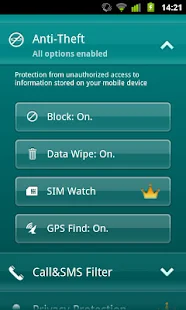
Kaspersky Mobile Security Lite delivers essential anti-theft defense,
allowing you to block, wipe or find your missing phone. You can also easily filter unwanted
SMS texts and calls. Plus,
Anti-Virus Lite with cloud-based security scanner alerts you to potentially malicious apps
before they can harm your phone.

ANTI-VIRUS LITE: Alerts you to potentially malicious apps before they can harm your phone
ANTI-THEFT PROTECTION: Remotely block, wipe or find your phone if it is lost or stolen
CALL & SMS FILTER: Blocks unwanted calls and SMS texts
SUPPORTED LANGUAGES
Danish, Dutch, English, Finnish, French, German, Italian, 
Korean, Norwegian, Polish, Portuguese (Brazil), Russian, 
Spanish, Swedish
SYSTEM REQUIREMENTS
Android 1.6 – 2.3
UPGRADE TO ADVANCED VERSION!
Kaspersky Mobile Security offers advanced protection for your smartphone:
• Anti-Theft Protection – Remotely block, clean or find your missing phone even if your
 SIM card has been replaced
• Anti-Virus Protection – The latest technologies prevent viruses and spam from infecting
your phone while you’re surfing the Internet. Plus, automatic, cloud-based scanning of
downloaded apps
• Call & SMS Filter: Blocks unwanted calls and SMS texts
• Privacy Protection – Hides designated contacts, and controls what others can see
and access on your phone
*www.av-test.org/fileadmin/pdf/avtest_2012-02_android_anti-malware_report_english.pdf
==================================================================================
Google Playstore Download
4Shared Download

Ubuntu Lock sceen for all phones

imgimgimg

Ubuntu lock screen

The Ubuntu lock screen is the first Ubuntu Touch OS lock screen for Android. Its easy to use and it have the elegance and innovate style from Ubuntu Touch OS. It also have many settings that can be changed, from animations to colors. Although its still on beta stages it stable enough to use it every day!
Its the perfect app for those who like Ubuntu and/or like to try new and unique apps.
It include features like:
All notifications can be shown, just enable the Accessibility Service and set it up.
Password security (More unique security types to come)
Animations
Locking timer
Easy to use music buttons
=================================================================================
Google Playstore Download
4Shared Download

Instructions

Here are the instruction to flash roms.

Roms in which we need to create sd-ext partition 

  1. All the Roms with hTC Sense higher than 4.0
  2. In some MUI based roms
    Note:
           If you don't know how to create sd-ext partition then Follow this link

Instruction 

Create sd-ext partition then follow bellow process.
Step 1:
• Download the rom you want to install

Step 2:
• Now, Connect your HTC Explorer by using a proper data cable to your PC.

Step 3:
• Copy the downloaded files on your device’s SD card.

Note:
      Do not extract any files.

Step 4:
• Now switch off your device or remove battery and insert.

Step 5:
• Press Volume down key and power button together for 10 sec then bootloader mode menu is displayed. Select recovery option on the menu.

Note:
       Use volume keys to navigate and Power button to confirm choice.


                           For CWM recovery only


Step 1:
• After rebooting in ClockWorkMode Recovery you need to select wipe data /factory reset.

Step 2 :
• Select wipe dalvik cache and wipe cache partition one by one.

Step 3 :
Mount sd-ext from recovery menu ( if you have problem i recommend you to install TWRP recovery. See requirements and Follow the link to install TWRP recovery & Follow this link to Create sd-ext partition)

Step 4:
• Select install zip from SD card from the recovery menu.

Step 5 :
• And select option chooses zip from sdcard.

Step 6 :
• After downloaded files is navigated press next.

Step 7 :
• The installation process starts. You are not required to do anything.

Step 9:
• Finally, Select +++Go Back++++ and then Reboot System now option.

Step 10 :
• Your device will reboot. It takes a few minutes for setting up OS environment wait for 15-30 minute until device start completely.
Congratulation! Now your HTC Explorer runs on Custom rom.

Note: 

If you get stuck on boot animation install latest TWRP recovery and procced. From here


                          For TWRP recovery/ other recovery


Step 1:
• After rebooting in TWRP / team win Recovery you need to select wipe data /factory reset from wipe .

Step 2 :
• Select wipe dalvik cache and wipe cache partition one by one from wipe. Go back to home

Step 3 :
• Before install go to mount from the menu and select mount sd-ext.Select install from the recovery menu.

Step 4 :
• And select downloaded zip from sdcard.

Step 5 :
• After downloaded files is navigated press next.

Step 6 :
• The installation process starts. You are not required to do anything.

Step 7:
• Finally, Select reboot and then System option to reboot into system wait for 15- 25 min. 

            Roms in which we don't need to create sd-ext partition 

  1. All the except htc sense 4.0 and above including MUI roms can be Flashed by the bellow process
Instruction 

Step 1:
• Download the rom you want to install

Step 2:
• Now, Connect your HTC Explorer by using a proper data cable to your PC.

Step 3:
• Copy the downloaded files on your device’s SD card.

Note:
      Do not extract any files.

Step 4:
• Now switch off your device or remove battery and insert.

Step 5:
• Press Volume down key and power button together for 10 sec then bootloader mode menu is displayed. Select recovery option on the menu.

Note:
       Use volume keys to navigate and Power button to confirm choice.

       For CWM recovery only


Step 1:
• After rebooting in ClockWorkMode Recovery you need to select wipe data /factory reset.

Step 2:
• Select wipe dalvik cache and wipe cache partition one by one Not sd card.

Step 3:
• Select install zip from SD card from the recovery menu.

Step 4 :
• And select option chooses zip from sdcard.

Step 5 :
• After downloaded files is navigated press next.

Step 6:
• The installation process starts. You are not required to do anything.

Step 7:
• Finally, Select +++Go Back++++ and then Reboot System now option.

Step 8 :
• Your device will reboot. It takes a few minutes for setting up OS environment wait for 15-30 minute until device start completely.
Congratulation! Now your HTC Explorer runs on Custom rom.

Note:
If you need to install Google apps follow same process from step 3

                               For TWRP recovery/ other recovery


Step 1:
• After rebooting in TWRP / team win Recovery you need to select wipe data /factory reset from wipe .

Step 2 :
• Select wipe dalvik cache and wipe cache partition one by one from wipe not sd card. Go back to home

Step 3:
• And select downloaded zip from sdcard.

Step 4 :
• After downloaded files is navigated press next.

Step 5 :
• The installation process starts. You are not required to do anything.

Step 6:
• Finally, Select reboot and then System option to reboot into system wait for 15- 25 min

Note:
 if you need to install Google apps follow same process from step 3